On this page
Download the free 5S template
This 5S template gives you everything you need for your first 5S audit on one printable PDF: a 5S audit checklist with 25 criteria and scoring, two red tags to copy and cut out, and a 5S action plan to turn findings into improvements. It is free to copy, adapt and use in your company, with no sign-up.
New to the method? Read what 5S means first, then come back for the audit.
What is inside the 5S template
| Page | What it is for | When you use it |
|---|---|---|
| 1 · 5S audit checklist | Rate the area on five criteria per S and add up the scores | During every audit walk |
| 2 · Red tags | Mark items whose use is unclear and decide on them later | During Sort, and when new clutter appears |
| 3 · 5S action plan | Track every finding with an owner and a due date | Right after the audit, then in every team meeting |
How to run a 5S audit in six steps
- Agree the area and its boundariesA workstation, a line or an office zone. Smaller areas give clearer results, especially at the start.
- Walk the area with the teamAn auditor from outside plus one team member from inside. Take photos of good and bad examples.
- Rate every criterion from 0 to 4Score what you see today, not what is planned. When in doubt, choose the lower score and note why.
- Add up each S and the totalEach S scores up to 20, the total up to 100. Circle the lowest S: that is where to start.
- Write the findings into the action planOne line per finding, with an owner and a due date. Three strong actions beat fifteen vague ones.
- Post the result and set the next dateHang the scores and photos on the team board and fix the date of the next audit before you leave.
The 25 criteria of the 5S audit checklist
These are the criteria on page 1 of the template. Each one describes what “good” looks like, so the auditor rates the current state against a clear picture instead of a feeling.
1 · Sort (Seiri)
- Only items needed for current work are in the area.
- Unneeded items are red-tagged or removed.
- Walkways, exits and safety equipment are free of obstruction.
- No material, WIP or stock beyond the defined limits.
- A red tag area exists and is reviewed regularly.
2 · Set in order (Seiton)
- Every item has a defined, labelled place.
- Tools and materials are stored by frequency of use, within reach.
- Floor markings show walkways, workplaces and storage areas.
- Quantities are visible (min/max marks, Kanban or fill lines).
- Items are returned to their place after use.
3 · Shine (Seiso)
- Floors, machines and workstations are clean.
- Cleaning tasks, frequency and owners are defined.
- Sources of dirt, leaks and spills are identified and addressed.
- Cleaning materials are available and stored in a fixed place.
- Cleaning is used as inspection: defects are found and reported.
4 · Standardise (Seiketsu)
- 5S standards (photos, checklists) are visible at the workplace.
- Labels, colours and markings follow one common standard.
- Responsibilities for 5S tasks are assigned and visible.
- Visual controls show abnormalities at a glance.
- The standard is updated whenever an improvement is made.
5 · Sustain (Shitsuke)
- 5S audits take place regularly and results are displayed.
- Actions from the last audit have been completed.
- Everyone in the area is trained in 5S and knows the standards.
- Leaders check 5S during their gemba walks.
- The team suggests and implements 5S improvements.
Scoring: what the numbers mean
| Score | Meaning | Typical sign |
|---|---|---|
| 0 | Not started | Nobody has looked at this criterion yet |
| 1 | Weak | Single attempts, but most of the area does not meet it |
| 2 | Partly in place | Done in parts of the area or only after a reminder |
| 3 | In place | Met across the area at the time of the audit |
| 4 | In place and sustained | Met over several audits, owned by the team, improved further |
Using the red tags during Sort
During Sort, the team decides for every item whether it is needed. When nobody is sure, the item gets a red tag and goes to a marked red tag area. Someone with the authority to decide reviews the area within a fixed time, for example two weeks, and chooses: dispose of it, return it to stores, move it to another area or keep it with a defined place.
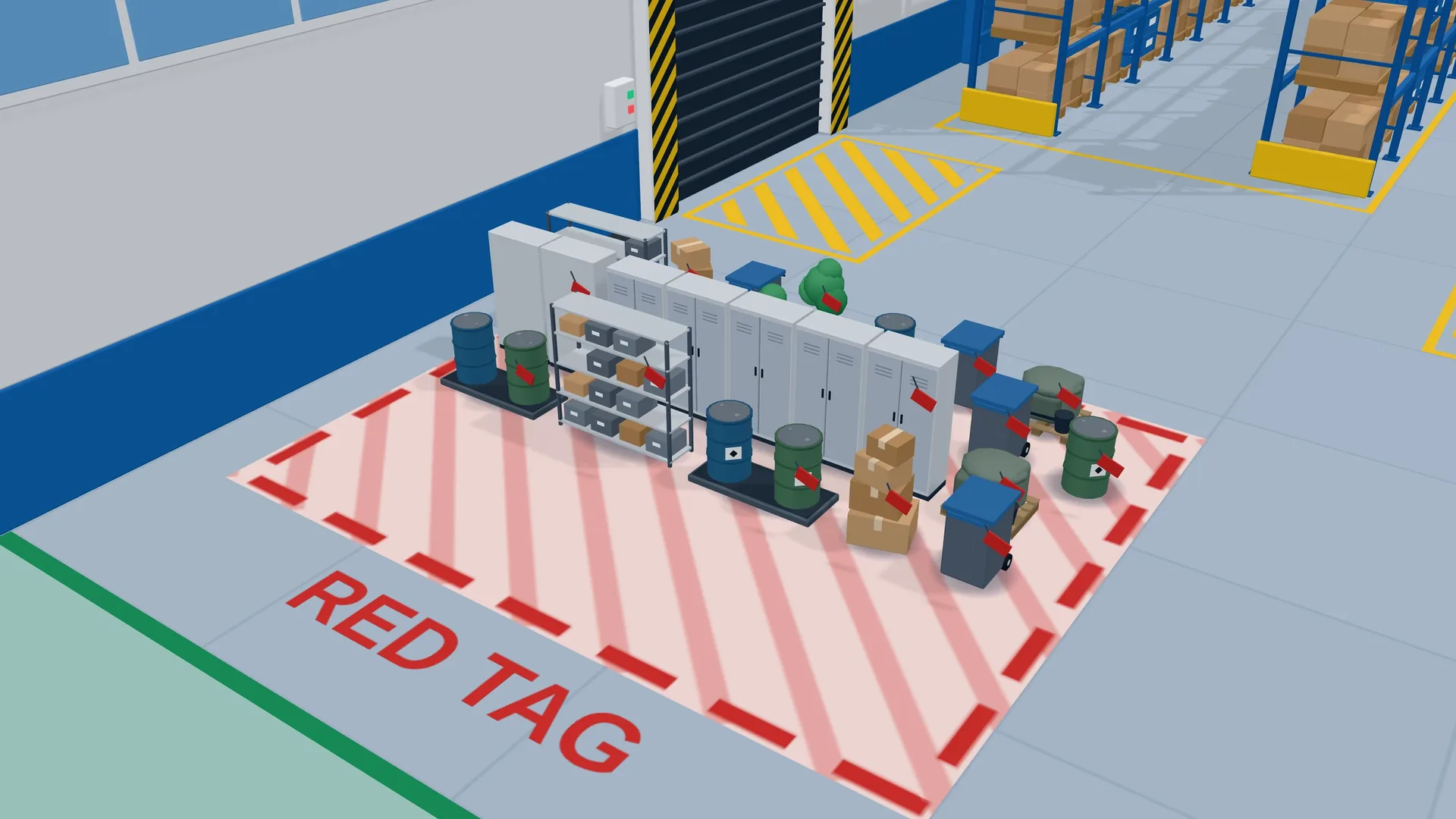
See how a red tag area works in practice in our article on the 5S red tag area.
From findings to actions: the 5S action plan
An audit only helps if something changes afterwards. Page 3 of the template turns every finding into a line with the S it belongs to, an action, an owner and a due date. Review the plan in the team meeting until every line is closed, and check the result in the next audit.
- Start with actions that remove a daily annoyance; quick wins build trust in 5S.
- Give every action one owner, not a department.
- Close actions with a photo of the result, so the next audit can compare.
Make 5S stick
The first three S are a clean-up; the last two decide whether it lasts. Teams sustain 5S when the standard is visible, the audit has a rhythm and leaders look at it during their gemba walks. It also helps when people have experienced the difference: in a hands-on Lean game, a team sees in one round how much searching and walking disappears after 5S, and brings that picture back to its own workplace.
Looking for more templates? All free downloads are on our page of free Lean templates.
Frequently asked questions.
What is a 5S audit checklist?
A 5S audit checklist is a list of criteria for each of the five S (Sort, Set in order, Shine, Standardise, Sustain) that an auditor rates during a walk through the area. The scores show where the workplace stands and which S needs attention next.
How often should we do a 5S audit?
Many teams start weekly while 5S is being introduced and move to a monthly rhythm once the standards are stable. What matters most is a fixed rhythm, visible results and that the actions from the last audit are done before the next one.
Who should carry out the 5S audit?
Ideally someone from outside the area together with a team member from inside. The outside view spots what people stop seeing, the inside view knows the reasons. Rotating auditors also spreads 5S knowledge across teams.
What score is good in a 5S audit?
With this template, each S scores up to 20 and the total up to 100. Rather than chasing a target number, compare an area with its own previous audits and focus on the lowest S first. A rising trend over several audits is a better sign than a single high score.
Can I change the 5S template?
Yes, it is free to copy and use. Adapt the criteria to your area, for example office, warehouse or workshop, but keep the structure of the five S and the 0 to 4 scale so results stay comparable over time.
What is a red tag in 5S?
A red tag marks an item whose use is unclear during Sort. Tagged items go to a red tag area, and someone decides within a fixed time whether to dispose of, return, move or keep them. This keeps Sort quick without throwing away anything important.